Guides / Switching
Guide · SwitchingHow to switch gym software without losing members
Members rarely leave because you changed software. They leave because of a surprise charge, a booking that vanished or a switch nobody explained. Here is the order of work that avoids all three.
The short version
- Keep your old system running, and billing, until the new one has worked for real for at least a week.
- Export everything twice: once to plan the move, and again just before you switch over.
- Check the move row by row. The member and lead counts should match exactly before anything goes live.
- Move billing last, on one date, so nobody is charged twice or not at all.
- Tell members what is changing and what they need to do, at least twice before the day.
Most gym owners put off switching software for a year longer than they want to. The software is rarely the reason. The fear is the move itself: members who get charged twice, a schedule that disappears on a Monday night, a front desk that cannot find anyone.
Those are real risks, and every one of them is avoidable. They come from doing the steps in the wrong order, not from switching. This guide is the order we follow, learned moving a busy gym off Glofox with every member and lead record accounted for.
Why switches go wrong
When a move goes badly, it is almost always one of three things.
- Billing surprises. A member is charged by both systems, or by neither, or an old plan nobody cancelled starts charging again.
- Silence. Members find out from an email they did not expect, or from a login that no longer works.
- Missing data. A family's children are not linked, a lead from last month is gone, or a class someone booked has vanished.
Each one has a fix that costs a little time up front. The plan below spends that time where it matters: on checking the data, running both systems side by side, and moving billing last.
The plan, in four phases
For an independent gym or studio, the whole move usually takes two to four weeks. Most of that is checking and practising, not waiting.
- Week 0Plan and read the contractFind your notice period, pick a switch-over date and decide who owns each step.
- Week 1Export, import and checkBring members, leads and plans across, then check every row until the counts match.
- Week 2Run both systems side by sideStaff use the new system for check-in and bookings while the old one keeps billing.
- Switch-over dayMembers and billing moveMembers get their invites, and billing moves on one date, so nobody is charged twice.
1. Plan before you give notice
Start with your current contract, not the new software. Find three things: the notice period, any early-exit fees, and the rules for releasing your data when you leave. Some providers only release exports after any outstanding fees are paid, so it is worth knowing before you set dates.
Then write down a one-page plan. It does not need to be fancy. It needs to answer:
- What date will members start using the new system, and what date does billing move?
- Who exports the data, and who checks it? (Two different people is better.)
- Which staff need training, and when?
- What will you tell members, and when will they hear it?
Pick a quiet switch-over day early in a billing cycle, with an owner or manager on the front desk. Avoid gradings, events, the first week of a new term and the day before a billing run.
2. Export everything, then export it again
Your data is the part of the move you cannot redo, so take more than you think you need. Ask your current provider for every export they offer, and save the files somewhere private, not in an email thread.
| Export | Why it matters |
|---|---|
| Members, by status | Active, frozen, expired and cancelled members, so you can decide who moves. |
| Leads and trials | Your follow-up list. Easy to forget, painful to rebuild. |
| Memberships and plans | Names, prices and who is on each, so you can recreate your offers. |
| Attendance history | Belt readiness, streaks and who has gone quiet all depend on it. |
| Waivers and agreements | A record of who signed what, and when. |
| Families and notes | Which children belong to which parent, plus notes your staff rely on. |
Export once early, to plan and test the move. Then export again a day or two before the switch, so anyone who joined or changed their details in between comes with you. If you are on Glofox, our guide to exporting your data from Glofox covers the files in detail.
3. Check every row
An import that "mostly worked" is how members go missing. The goal is simple: the number of members and leads in the new system matches the old one exactly, and every difference has a reason you wrote down.
Before anything goes live, look for:
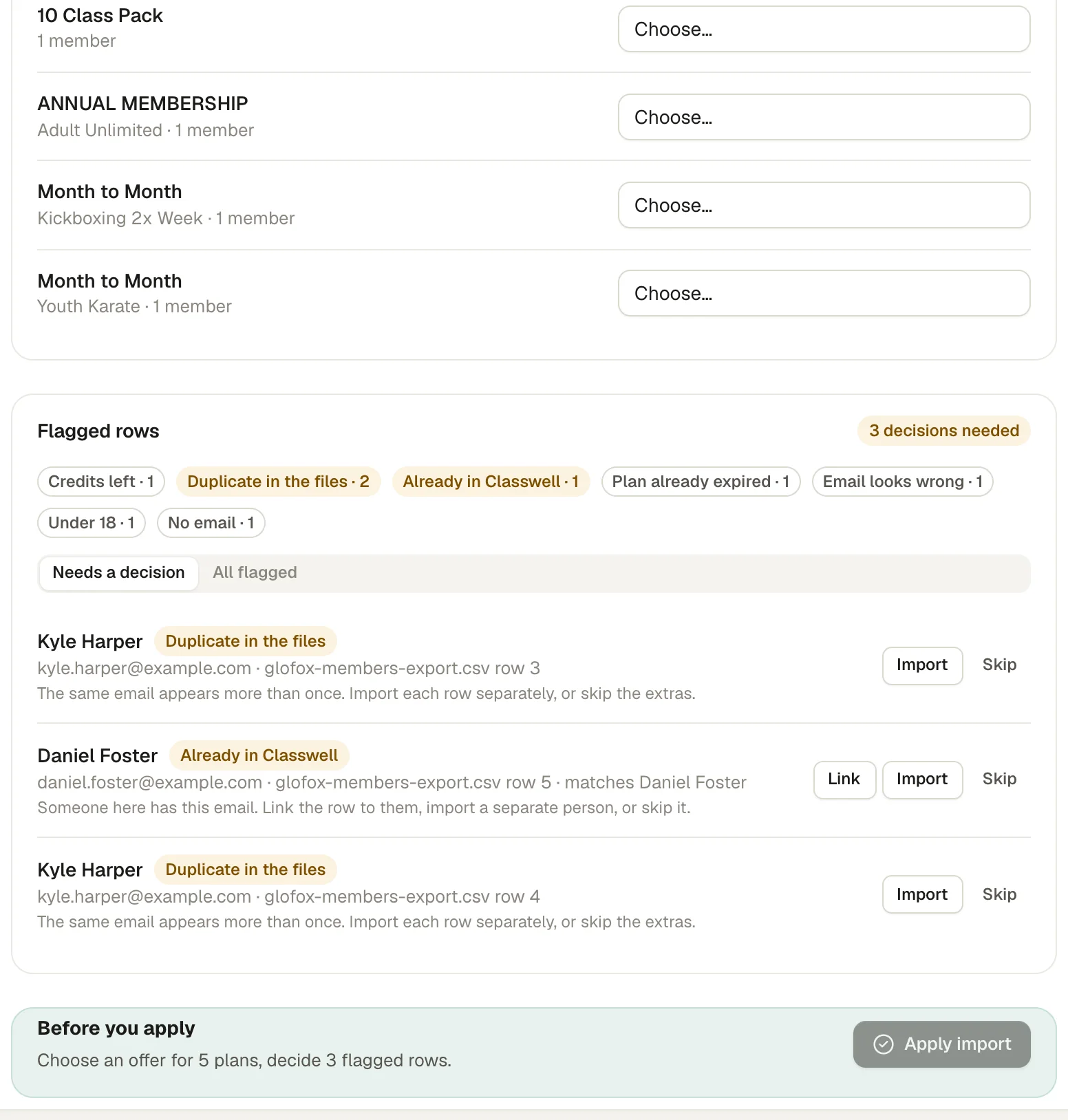
- Duplicates in the file. The same email on two rows, often a parent with two children or someone who signed up twice.
- People already in the new system. Staff who added test members, or anyone you entered by hand.
- Missing or broken emails. Without an email, a member cannot sign in to the new app.
- Children without a guardian. Kids need a linked parent to book and sign.
- Plans that do not map. Old or misspelled plan names that need a home in your new offers.
Good import tools show you all of this before creating anything, and let you decide row by row: import, link to an existing person, or skip. When we moved R1P Fitnessoff Glofox, the final counts were 189 of 189 members and 3,716 of 3,716 lead records, with every flagged row decided by a person.
4. Run both systems side by side
This is the step people skip, and the one that prevents a bad Monday. For a week or two, staff use the new system for the jobs that do not involve money, while the old system keeps billing members exactly as before.
- Check members in at the front desk and on a self check-in kiosk.
- Run the real schedule: classes, capacity, waitlists and coaches.
- Collect waiver signatures from anyone who needs one.
- Work your leads and trials in the new pipeline.
Members barely notice this phase, which is the point. Your staff learn the new system on real days, and any gap in the data shows up while the old system is still there to check against.
5. Move billing last, on one date
Billing is the step that is hardest to undo, so it goes last. The rule is one switch-over date: before it, the old system bills; after it, the new one does. Never both.
What happens to stored cards
Card numbers never travel in a spreadsheet. Payment processors move stored cards directly between themselves, under the card industry's security rules, and usually only when the account owner asks. Stripe, for example, documents this as a payments data import: your previous processor sends the data, which can take from a few days to several weeks, and Stripe typically imports it within ten business days of receiving the correct files.
Before any cards move:
- Cancel plans that should have ended. A transferred card attached to a forgotten plan can charge someone who thought they had left.
- Set new memberships to start billing on the switch-over date, not the import date.
- Plan for cards that cannot be moved. Those members will need to re-enter their details, so write that message now.
6. Tell members early, and tell them twice
Members forgive change. They do not forgive surprises. Two short messages are enough for most gyms: one about two weeks before the switch-over, and one a day or two before it, with the single action you need from them.
Hi Sam, a quick heads-up from all of us at Cedar Martial Arts.
On Monday, March 2 we are moving to a new booking app. You will get an email invite that day. Tap it, and you can book classes, show your pass at the door and see your kids' schedule in one place.
Your membership and price are not changing. If anything looks wrong, reply to this email or ask us at the desk.
Send invites in small batches first: staff, then a few regulars, then everyone. Check the first ones arrive in inboxes rather than spam folders before you send the rest.
A switching checklist
Print this, or copy it into your own plan.
- Notice period, exit fees and data-release rules confirmed in writing.
- Switch-over date chosen, early in a billing cycle and away from events.
- Every export saved privately: members, leads, plans, attendance, waivers, families.
- Import checked row by row, with member and lead counts matching exactly.
- Staff trained, and one to two weeks of check-ins and bookings run in the new system.
- Dead plans cancelled before any cards move.
- Billing moves on a single date, and the old system's billing is switched off that day.
- Two member messages sent, invites tested in small batches first.
- Final export taken from the old system before the account closes.
If you would like the data part done for you, that is what our switching service is for. We also have specific notes for moving fromGlofox, Mindbody, PushPress, Wodify andZen Planner. Still choosing? Start with how to choose gym management software.
Questions owners ask
How long does it take to switch gym software?
For an independent gym or studio, plan on two to four weeks from the first export to members using the new system. The data move itself is usually a few days; most of the time goes on checking it, training staff and running both systems side by side.
Should I cancel my old gym software before I start?
No. Keep it running, and keep it billing, until the new system has handled real check-ins and bookings for at least a week. Read your contract first so you know the notice period, then give notice once your switch-over date is fixed.
Will my members have to re-enter their card details?
Not always. Card details can usually be moved from one payment processor to another on request, but the old processor has to cooperate and it can take days to weeks. If cards cannot be moved, members re-enter them, so plan the message for that case too.
Can I bring attendance history and leads with me?
Usually, if your old system includes them in an export. Ask for attendance and lead exports early, because they decide things like belt readiness and who to follow up with after the move.
What is the best day to switch over?
A quiet day early in a billing cycle, with an owner or manager at the front desk. Avoid gradings, events, the first week of a new term and the day before a billing run.
Sources
- Request a payments data import, Stripe Docs
- Payment Card Industry Security Standards Council, PCI SSC
Read next
 Switching · 6 min read
How to export your data from Glofox, and check it
Your members, leads and history are yours, and an export is how you take them with you. This is the list of files to ask for, how to check them, and the mistakes that cost gyms a week. Choosing software · 7 min read
How to choose gym management software: a checklist for small gyms
Feature lists all look the same. The differences show up on a busy Monday evening, in the payment terms and on the day you want to leave. This checklist tests for those. Front desk · 6 min read
How to set up a self check-in kiosk for your gym
A tablet by the door can take check-ins off your front desk entirely, if it is in the right place, locked to one app and set up with sensible rules. This is what we learned setting one up at a busy gym.See it on a real schedule, not a sales call.
The demo gym runs on sample data. Click through the Today screen, the kiosk, the member app and a Glofox switch. No sign-up.